- Quick Answer
Claude is ideal if you want to build an AI assistant that works your way. You can teach it your processes, preferences and skills, so it follows your instructions consistently without having to explain everything repeatedly.
ChatGPT Work is ideal if you want to delegate the work. You define the outcome, and AI figures out the steps to achieve it. Once you’re satisfied with the results, you can reuse the successful workflow for similar tasks.
Claude vs ChatGPT Work: Are We Comparing the Wrong Things?
Every few months, a new AI update makes us question whether we’re using the right tool. First, everyone’s talking about Claude. Then ChatGPT introduces something new, and suddenly switching back sounds tempting.
But I think we’re getting distracted.
We’ve spent so much time comparing AI tools, yet many of us are still repeating the same instructions, checking half-finished work and stitching together outputs from multiple conversations.
Wasn’t AI supposed to take some of that work off our plates?
That’s why I think the Claude vs ChatGPT Work debate needs a different perspective. Instead of chasing whichever platform has the latest features, I’d start with one question.
Do I need an AI assistant that understands how I work, or do I need AI to take a substantial piece of work off my hands?
Because the real goal isn’t to use the most impressive AI tool. It’s to get more work done without having to manage every little step.
Both Can Do the Work. So What Actually Decides It?
Both Claude and ChatGPT Work can do considerably more than answer questions.
Depending on your subscription, permissions and available integrations, both can work across documents, use connected applications, undertake multi-step assignments, prepare deliverables and support recurring workflows.
Both can also be configured around your requirements.
So I wouldn’t choose between them simply because someone claims one is better at research, reports or automation.
Those differences can matter for particular tasks, but they don’t tell us enough about what we actually need.
Instead, I’d look at two approaches.
- Build an AI assistant: Configure AI around your working methods, preferences, reference materials and quality standards, so you can reuse a process with less repeated explanation.
- Delegate work to AI: Define a goal, provide the necessary context, review the approach and let AI undertake multiple steps towards a finished outcome.
Of course, neither platform is limited to just one approach.
But rather than getting caught up in which tool has more features, I think it’s more useful to start with what you actually want AI to take off your plate.
Build an AI Assistant, or Delegate Your Work to AI
Imagine you’re responsible for preparing your company’s marketing performance report.
Every month, you need to review campaign data, compare results against targets, explain unusual changes and prepare recommendations for management.
At first glance, it sounds like a perfect job for AI. But there are two ways to approach it.
A. Claude: Build an Assistant That Knows How You Work
I see Claude as an opportunity to teach AI how I want things done, rather than explaining myself every time.
Let’s say I prepare a monthly marketing report. I have my own way of analysing campaign performance, identifying problems and presenting recommendations.
With Claude, I can turn that knowledge into reusable Skills, instructions and workflows. I’m essentially teaching my AI assistant what to do, how to do it and which standards to follow.
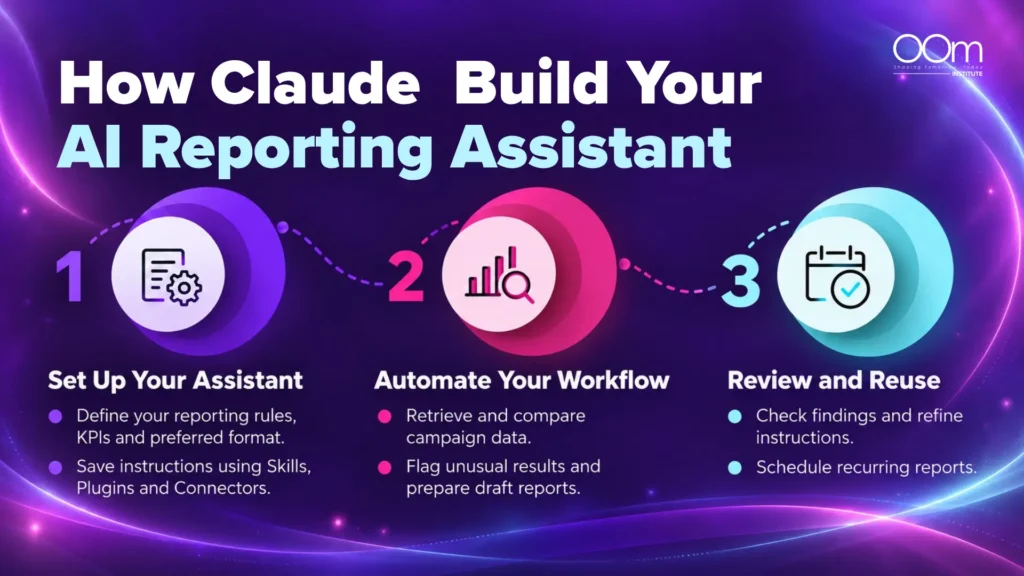
The next time I need a report, I don’t have to explain the entire process again. My assistant can follow the method I’ve established, using updated information while I review the results.
Once you’ve taught Claude your way of working, your AI assistant can follow the same process each month to:
- Gather the latest campaign results from your connected platforms and files.
- Compare performance with last month’s results and your marketing targets.
- Follow your reporting style to present information the way you prefer.
- Spot problems or missing information that need your attention.
- Prepare your monthly report with key findings and suggested next steps.
💡The goal is simple: Teach AI my way of working once, so I don’t have to keep repeating myself.
B. ChatGPT Work: Delegate a Job and Manage It to Completion
With ChatGPT Work, I would take a different approach. Instead of teaching AI every step of my process, I’d focus on telling it what I need to achieve.
For example, I could ask ChatGPT Work to investigate why website enquiries have declined and prepare a management report with findings and recommendations.
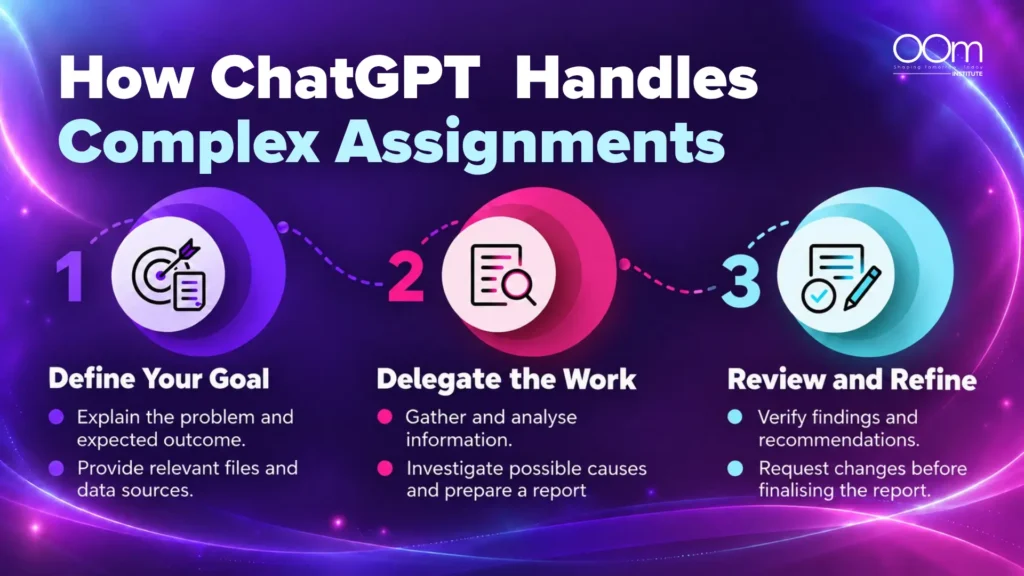
I don’t necessarily need to decide how it should organise the research, analyse the information or put the report together. I define the outcome, provide the context and let AI figure out how to get there.
Of course, I’d still review the findings and make adjustments where necessary. But I wouldn’t have to manage every individual step or repeatedly refine separate outputs.
And here’s the best part. Once I’m satisfied with the result, I can save the instructions and successful workflow for similar assignments in the future. Rather than starting from scratch, I can reuse what worked and adapt it to the next task.
💡The goal is simple: Tell AI what I want to achieve, let it handle the execution and reuse the successful approach when I need it again.
| Build an AI Assistant: Claude Approach | Delegate the Work: ChatGPT Work Approach | |
| The big idea | Teach AI how you work | Tell AI what you want to achieve |
| You start with | Your processes, preferences and recurring needs | A goal, relevant context and expected deliverable |
| Your main task | Setting up and improving a repeatable workflow | Directing the assignment and reviewing its progress |
| Useful starting point | >Monthly reports, weekly updates and repeated administrative tasks | Research projects, business investigations and substantial assignments |
| What you end up with | A reusable AI assistant configured around your work | A completed piece of work, potentially with a reusable method |
| Where you spend more effort | Creating instructions and testing how consistently they work | Defining the outcome, checking the plan and evaluating the result |
I wouldn’t interpret this table as proof that Claude is only for recurring tasks or ChatGPT Work is only for one-off assignments.
Both can support either approach.
But it gives us a way to decide what we want to learn first.
But Why Do So Many People Still Struggle to Get Results?
We can have access to powerful AI tools and still be disappointed with their outputs.
I don’t think the solution is always another feature, a longer prompt or a different subscription.
Sometimes, the work itself hasn’t been defined properly.
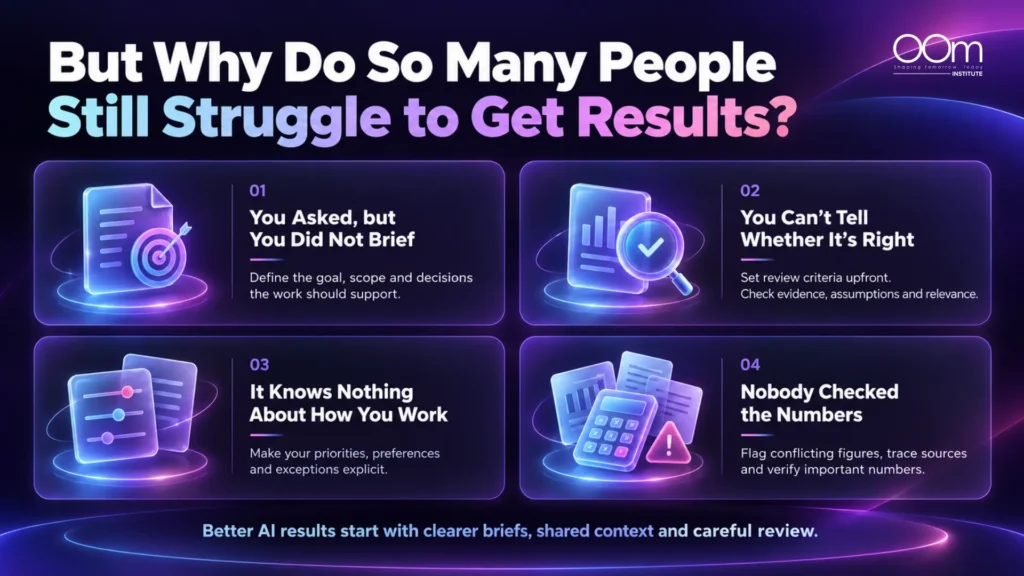
1. You Asked, but You Did Not Brief
There’s a difference between asking AI to prepare a competitor analysis and giving it an actual assignment.
“Prepare a competitor analysis” leaves too many decisions unresolved.
Which competitors? Which market? What information matters? What will the analysis be used for?
I’d rather brief AI as I would a colleague taking responsibility for the task.
For example, “compare three relevant competitors in Singapore, examine their positioning and publicly available pricing, identify information that cannot be verified and recommend actions for the next quarterly marketing plan.”
A good brief shouldn’t just describe what to produce. It should explain what decisions the work is supposed to support.
2. You Can’t Tell Whether It’s Right
A polished report can still lead to a poor decision.
Imagine AI recommends reducing advertising expenditure because one campaign appears to have a higher cost per lead.
That recommendation might sound logical.
But does it account for lead quality? Sales conversion rates? Differences in attribution? Or how long each campaign has been running?
If we don’t know what evidence matters, we may struggle to evaluate the recommendation.
This is why I’d define the review criteria before delegating the work, rather than only after seeing an impressive-looking result.
3. It Knows Nothing About How You Work
Connecting documents doesn’t automatically mean AI understands your organisation.
It may have access to a previous report without knowing why the report follows a particular structure.
It may see a list of KPIs without knowing which ones management considers most important.
The context that makes work useful often sits in undocumented decisions, preferences and exceptions.
Whether we’re building an assistant or delegating an assignment, we need to make that context explicit.
4. Nobody Checked the Numbers
This is one mistake I’d be particularly careful about.
Suppose a sales spreadsheet and a management dashboard show different revenue totals.
There may be a legitimate explanation, such as different reporting periods, refunds or exclusions.
But if AI combines those figures without identifying the discrepancy, the finished report could be misleading.
I’d expect the workflow to flag conflicting information, identify its sources and explain what remains unresolved.
And I’d still verify important figures before using the report for business decisions.
My view is that successful AI adoption depends as much on our ability to define and evaluate work as it does on the tool executing it.
This is also why learning about Agentic AI course can be valuable. Understanding how multi-step AI workflows operate helps us recognise what can be delegated, where controls are necessary and when human judgement remains essential.
What If You Pick the Wrong One?
One reason people hesitate to invest time in an AI platform is the fear of having to start over.
What happens if I spend weeks configuring Claude, only to decide ChatGPT Work is more suitable later?
I’d look at this in two ways.
A. Your Setup Can Move, Although Not Always Perfectly
ChatGPT’s desktop app provides an import feature for supported configurations and recent work from other AI agents, including Claude.
Depending on what’s supported, this can include instructions, settings, Skills, Plugins, projects and recent work.
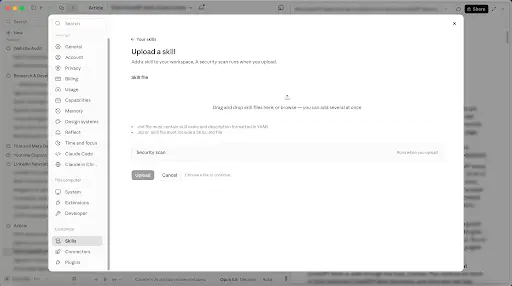
Similarly, Claude allows you to upload existing instructions, Skills and workflow files from ChatGPT to help recreate your AI assistant’s setup.
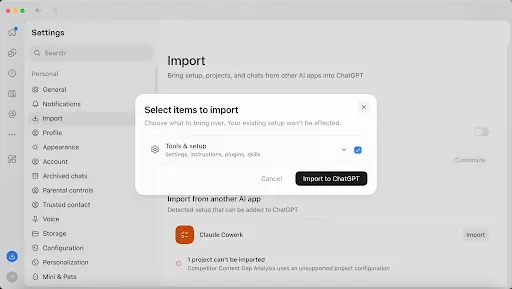
ChatGPT desktop Import screen showing Claude as an available source
ChatGPT desktop Import screen showing Claude as an available source
The import process also provides ways to complete connections requiring further authorisation. Importing does not delete the original setup.
However, I wouldn’t assume every instruction, integration or workflow will behave identically after migration.
Platform-specific features may need adjustments, connections may need reauthorisation and imported workflows should be tested.
B. Your Skills Move Too
This is the part I’d consider more important.
If you’ve learned how to brief a complicated assignment, document a repeatable process, establish review criteria and verify information, those skills don’t belong exclusively to Claude or ChatGPT.
You might need to learn a different interface or adapt your configuration.
But you don’t lose your understanding of how the work should be done.
That’s why I wouldn’t spend too much energy trying to predict which platform will dominate six months from now.
I’d choose based on what I need today, develop a working method and keep the important instructions and reference materials organised.
C. So the Choice Isn’t Permanent
I wouldn’t worry too much about choosing the perfect AI platform today. Both Claude and ChatGPT Work will continue to evolve, and what works best for you now may change as your needs grow.
The good thing is that you’re not locked into one platform. You can bring over parts of your existing setup, adapt your workflows and apply the skills you’ve already learned.
So rather than waiting to see which AI tool comes out on top, I’d start with the one that solves my biggest workplace challenge today. You can always explore the other when your needs change.
5 Questions to Work Out Which One You Need
If you’re still undecided, I would use these five questions rather than another lengthy feature
Ask yourself | Lean towards building | Lean towards delegating |
1. What frustrates me most? | Repeating instructions every session | Having to complete the remaining steps myself |
2. What kind of work do I handle? | Predictable recurring work | Substantial, multi-step assignments |
3. What do I need first? | A process I can reuse | A specific deliverable completed |
4. Where does my information live? | Familiar, regularly used sources | Several sources that must be brought together for one assignment |
5. What do I want AI to take responsibility for? | Following my established working method | Managing more of the execution towards an outcome |
These answers aren’t a rigid scoring system. Your work may involve both types of needs, and your access to particular apps or files may influence the decision.
Here’s one final test I’d add.
Choose a real task and write down what would make AI genuinely useful.
If success means, “I don’t want to explain this process again next Monday,” start by learning to build a repeatable assistant.
If success means, “I need this complicated assignment completed without managing every small step,” start by learning to delegate more effectively.
You don’t need to master everything at once.
Check the Subsidy Before You Rule Out a Course
I don’t think choosing between Claude and ChatGPT Work should come down to which has more features. What matters is how you want AI to support your work.
If you want AI to follow your established processes without repeated instructions, Claude is a useful starting point. If you prefer to define an outcome and let AI manage the execution, ChatGPT Work may suit you better.
At OOm Institute, our Claude Agentic Bootcamp teaches you to build a personalised AI assistant, while our ChatGPT Work Bootcamp focuses on delegating substantial assignments and managing AI workflows.
Ultimately, you don’t need to master every AI tool. Start with the one that helps you work the way you want.
Before you enrol, check the funding attached to the exact course and ask the training provider to confirm your final nett fee. You can also explore OOm Institute’s courses and speak with our team to find out which programmes and funding options may apply to you.
Frequently Asked Questions
1. Should I use both ChatGPT Work and Claude?
You can, but you don’t necessarily need both. Since their capabilities overlap, I’d recommend identifying your primary workplace need and testing one platform first. Consider using both when you have a clear reason, such as a specific integration, organisational requirement or workflow that is better supported by the other platform.
2. Can I move my setup from one to the other?
ChatGPT’s desktop app supports importing selected configurations and recent work from Claude.
This can include instructions, Skills, Plugins and project-related material, subject to supported formats. Some connections may require reauthorisation, and workflows should be retested.
Moving from ChatGPT to Claude may require manually recreating parts of the setup.
3. Do I need to be technical to use either Claude or ChatGPT Work?
No coding knowledge is required for typical beginner workflows in either platform. You’ll still need to understand your work process, organise the necessary information, configure access where needed and review outputs. Some advanced integrations may involve additional technical requirements.
4. Which should I learn first if I have never used either?
If you’re tired of repeating instructions and want AI to follow your preferred way of working, Claude may be a better starting point. If you need AI to handle substantial assignments with less step-by-step guidance, ChatGPT Work may suit you better.
5. Is one better for spreadsheets, presentations and reports?
Both Claude and ChatGPT Work can support these deliverables, but the better choice depends on the complexity of the assignment, required output format, available integrations and quality of the results.
6. Is my data used to train the models?
It depends on your subscription, privacy settings and the provider’s data policies.
OpenAI states that ChatGPT Business, Enterprise and Edu are not used for model training by default. If you use a personal ChatGPT account, you can turn off Improve the model for everyone under Settings > Data Controls.
Anthropic also distinguishes between consumer and commercial data practices. Review its current privacy policies and the settings applicable to your account.
Before using workplace information, confirm your organisation’s policies and avoid sharing sensitive information without authorisation.
7. Are both the Claude and ChatGPT Work bootcamps eligible for funding?
No. According to OOm Institute’s course pages, both bootcamps are non-WSQ programmes and are not eligible for SkillsFuture Credit or government course fee subsidies.
8. Do I need to subscribe to Claude or ChatGPT for the bootcamps?
Yes. You will need an active Claude Pro subscription for the Claude Agentic Bootcamp or a ChatGPT Plus subscription for the ChatGPT Work Bootcamp.