- Quick Answer
Since 16 September 2026, Singapore Citizens aged 18 and above who complete an eligible AI course can claim six months of a premium AI tool for free. You choose one of five tools, ChatGPT Plus, Google AI Pro, Microsoft 365 Personal, Manus AI or Singtel AI Pass.
I think it’s a good scheme. It’s also easy to get wrong, because the offer doesn’t apply to every AI course. It only applies to course listings that carry a specific label on MySkillsFuture, and you can only claim it once.
It’s also not the only way to get help paying for AI tools. If you’re an NTUC member, UTAP now covers AI tool subscriptions too, with support of up to 50% after an approved AI course.
Below I’ll walk you through who qualifies, how to check a course before you book, how to redeem the subscription, and how to make sure a free perk doesn’t end up choosing your training for you.
What is the SkillsFuture AI Subscription?
The SkillsFuture AI Subscription initiative gives Singaporeans six months of free access to a premium AI tool after they complete a qualifying AI course. It was announced in Budget 2026 and went live on 16 September 2026, with more than 200 tagged courses on MySkillsFuture at launch.
The idea is simple. A course teaches you how to use AI, and the subscription gives you six months to practise on a paid tool without paying for it yourself.
Who Is Eligible for the Free AI Subscription?
A few minutes of checking before you pay saves you from finding out too late that the course doesn’t count.
| Condition | What it means |
| Citizenship | Singapore Citizen |
| Age | 18 and above |
| Course | Carries the “Free AI sub” label on MySkillsFuture |
| Course dates | Ends on or after 16 September 2026 |
| Redemption limit | Once per person, no matter how many qualifying courses you take |
One thing people often mix up is course funding and the free subscription. They’re separate. SkillsFuture Credit or other subsidies can still reduce your course fees, but being subsidised doesn’t make a course eligible for the subscription. Only the “Free AI sub” label does.
How Do You Check If an AI Course Qualifies?
A course qualifies only if its MySkillsFuture listing shows the “Free AI sub” label. It isn’t a judgement call about whether a course is “AI enough”. If the label isn’t on the listing, completing the course won’t get you the subscription, however good the course is.
- Go to the MySkillsFuture course search</a.
- Under SkillsFuture initiatives, filter by “Free AI sub”.
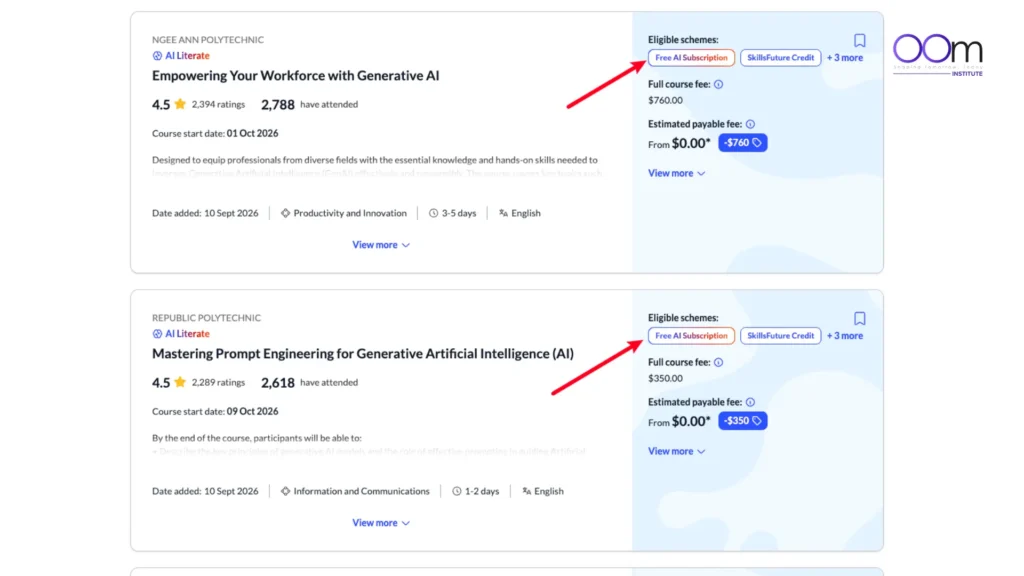
- Open the exact listing and course run you plan to book, and confirm the label is there.
Always check the listing itself rather than a course brochure or marketing page. The same course can run under more than one listing, eligibility can differ between course runs, and marketing pages go out of date faster than the portal does.
How Do You Redeem the Free AI Subscription?
Redemption happens after the course, not at enrolment.
- Complete the qualifying course
- Look out for the notification email with the redemption details
- Submit the redemption form yourself within 60 days of that email. Your trainer or training provider can’t submit it for you.
- Choose your AI tool on the form. Your choice is final once you submit, so you can’t switch later.
- Activate the subscription once it’s confirmed.
The 60-day window is the part people are most likely to miss, so I’d set a reminder the day the email arrives.
Which AI Tool Should You Choose?
Pick the tool that fits the work you already do, because you’ll get far more out of six months on a tool you open every day. Here’s how the five options compare.
| Tool | What you get | Best for |
| ChatGPT Plus | OpenAI’s paid ChatGPT plan, with higher usage limits and access to its premium features | Writing, summarising, research and brainstorming across any kind of work |
| Microsoft 365 Personal | Word, Excel, PowerPoint and Outlook with built-in AI features, plus cloud storage | People whose day runs on documents, spreadsheets and email in Microsoft Office |
| Google AI Pro | Expanded access to Google’s AI, including Gemini inside Gmail, Docs and Sheets | People who already work in Google Workspace |
| Manus AI | Credits for Manus, an AI agent that works through multi-step tasks on your behalf | Research, building slides and pulling together reports with less hand-holding |
| Singtel AI Pass | A bundle of six AI tools for the first three months, then one tool of your choice for the last three | People who want to try several tools before settling on one |
Singtel AI Pass works differently from the other four, so it’s worth a closer look.
For the first three months you get Manus, Hailuo AI (video generation), Otter.ai (meeting transcription), MiniMax Agent, MiniMax Audio and Akool (AI video and images).
After that, you keep one of them for the remaining three months. It suits someone who isn’t sure yet which tool fits their work, but it asks you to make a second decision halfway through.
Whichever you pick, remember your choice is final once you submit the form, so compare all five before you commit.
How Do You Get the Most Out of the Six Months?
Six months goes faster than you’d think, and most of the value comes from what you do in the first few weeks.
Start in week one, not month five. Pick two or three tasks you already do every week, like drafting emails, summarising meeting notes or preparing a report, and use the tool for those straight away. It’s much easier to build the habit on work you already have than to go looking for new things to try.
Apply what you learned in the course. The subscription is meant to help you practise, so go back to the techniques from your course and use them on real work. That’s where the skill actually sticks. Don’t get stuck hunting for the perfect prompt either. I’ve explained why I stopped looking for the perfect prompt framework, and the short version is that a good prompt fits the task in front of you, not a fixed formula.
Keep a simple record of the time you save. A quick note each week of what the tool helped with and roughly how long it saved you is enough. By month five you’ll know whether it’s worth paying for yourself, and if you want your company to pay for it, you’ll have the numbers to make the case.
Set a reminder before the six months end. Decide ahead of time whether you’ll pay to continue, switch to the free version or stop, so you’re not caught off guard.
Should the Free Subscription Decide Which Course You Take?
I don’t think it should. The subscription is a nice bonus, but it’s worth less than it looks.
Six months of a premium AI tool costs about the same as a few lunches, and it runs out. What you learn to do with it doesn’t. A course that leaves you able to direct AI tools well, in the work you actually do, is worth far more than a subscription attached to a course that doesn’t. You can also pay for any of these tools yourself for a fraction of what a course costs.
So my advice is to choose the course first, based on what you need to learn, who’s teaching it and how practical it is.
If you’re not sure where to start, I’ve written about how to choose your first AI course between Generative AI, Prompt Engineering and Agentic AI.
If that course happens to carry the “Free AI sub” label, great. If it doesn’t, you haven’t lost much. And because you can only redeem once, it’s worth saving that redemption for a course you’d have taken anyway.
Frequently Asked Questions
1. Can PRs get the free AI subscription?
No. The scheme is open to Singapore Citizens aged 18 and above.
2. I finished an AI course before 16 September 2026. Does it count?
No. The course needs to carry the “Free AI sub” label and end on or after 16 September 2026.
3. If I take two tagged courses, do I get two subscriptions?
No. Each person can redeem only one six-month subscription, however many qualifying courses they complete.
4. How long do I have to redeem?
You have 60 days from the notification email to submit the redemption form.
5. Can I switch to a different AI tool later?
No. Your choice is final once the form is submitted.
6. Where can I find the full list of eligible courses?
On MySkillsFuture. Filter the course search by the “Free AI sub” label, and check the specific listing before you book.
7. What happens after the six months end?
The free period ends. You can pay for the tool yourself to keep the premium features, or carry on with the free version where the tool has one.