
- QUICK ANSWER
I stopped looking for the perfect prompt framework because the framework was rarely what made a prompt work. Two prompts could follow the exact same structure and still produce very different results, since the real improvement always came from giving the AI better context, not from following an acronym more faithfully.
I used to think better prompting came down to finding the right framework. An AI prompt framework is essentially a structure that helps organise elements such as the task, context, role, goal and expected output. Every new acronym seemed to promise a more reliable way to get better results by rearranging those familiar ingredients.
After trying quite a few, I realised the framework itself was rarely the deciding factor. A detailed prompt could still produce something generic, while a much simpler one could work surprisingly well if it gave the AI the information that actually mattered. I still use an AI prompt framework today, but more as a useful checklist than a formula I need to follow every time.
So, what changed? Here is what I learnt from using different frameworks, testing them on real tasks and seeing where they helped, and where they did not.
🤔 Did Prompt Engineering Frameworks Actually Help Me Get Better AI Results?
When I first started using prompt frameworks, my outputs did improve. They pushed me to think about details I had often left unstated, such as the audience, purpose and expected format.
At first, I assumed the framework itself was doing the heavy lifting. In reality, the improvement came from giving the AI better information.
For example, I might have started with:
Create a social media campaign for our new product.
The result was usually broad because I had left the AI to guess the audience, platform, campaign goal and what kind of output I actually wanted.
Once I changed it to something more specific, the response became much more useful:
We are launching a S$49 monthly bookkeeping platform for Singapore freelancers who currently manage invoices and expenses manually. Develop three campaign angles for LinkedIn and Instagram that address concerns about accounting software being difficult to use. For each angle, provide the customer problem, key message and one sample post idea.
The difference was not that I had followed a particular acronym more faithfully. I had simply removed some of the guesswork.
That became even clearer when I experimented with more elaborate frameworks. I could include a role, task, context, goal and format and still get a mediocre answer if those details were vague. “Act as an expert marketer and create a detailed strategy to increase sales” may look structured, but it still tells the AI very little about the actual business problem.
That changed how I think about an AI prompt framework. I now use it as a reminder to check whether I have included the information that matters. If one of its components does not help the task, I do not add it just for the sake of completing the framework.
A. What Do Most Prompt Engineering Frameworks Have in Common?
After comparing enough AI prompt frameworks, I started noticing how much they overlap.
APE uses Action, Purpose and Expectation. RTF focuses on Role, Task and Format. TAG covers Task, Action and Goal, while RACE combines Role, Action, Context and Expectation.
When I need to clarify what the AI should do and what a useful result looks like
| Framework | Main Focus | When I Find It Most Useful |
| APE | Action, Purpose, Expectation | When I need to clarify what the AI should do and what a useful result looks like |
| RTF | Role, Task, Format | When the perspective and output structure matter |
| TAG | Task, Action, Goal | When I want a straightforward structure for outcome-focused work |
| RACE | Role, Action, Context, Expectation | When the task needs more background or situational detail |
The labels may differ, but they usually come back to the same basic questions: what should the AI do, what does it need to know, and what should the final output look like?
That is why understanding what prompt engineering is became more useful to me than memorising every acronym. Once I understood the purpose of context, examples, constraints and output instructions, I could use the elements that made sense for the task at hand.
❗ Why Can One Prompt Framework Not Fit Every Task?
I found that the amount and type of structure I needed changed quite a bit depending on the task.
If I wanted AI to rewrite an email, I might only need to provide the original message, who it was for and the tone I wanted. If I was comparing several software proposals, I needed much more context, including the proposals themselves, evaluation criteria and business constraints.
Image prompting worked differently again. A useful ChatGPT image prompt may need details about composition, perspective, lighting and visual style that would be completely irrelevant to a spreadsheet task.
That is why I no longer expect one AI prompt framework to suit everything. Forcing every task into the same structure often meant adding information just because the framework had a place for it, not because the AI actually needed it.
B. How I Choose a Prompt Structure Based on the Task
Now, I think more about where the task is most likely to go wrong.
If the AI might misunderstand the situation, I add more context. If the response could become too broad, I narrow the scope. If the structure matters, I specify the format. If the tone is difficult to describe, I provide an example.
For instance, if I were using AI to turn interview notes into candidate summaries, I would worry less about assigning it an impressive HR persona. I would focus more on making sure it does not invent information, apply inconsistent criteria, or include irrelevant personal details.
Thinking about the likely failure points gives me a much clearer idea of what the prompt actually needs.
🤔 How Much Structure Does My AI Prompt Actually Need?
One habit I had to unlearn was making my prompts longer whenever the output was poor.
Sometimes adding more context helped. Other times, I was simply giving the AI more instructions to process without improving the result. Now, I think about a few things before adding more structure: how complex the task is, how much room there is for misunderstanding, how many constraints matter and whether the output needs to follow a specific format.
A simple rewrite may only need one or two instructions. A research task, client recommendation or multi-stage analysis usually needs more context and clearer boundaries. The goal is not to make the prompt longer, but to give the AI enough information to complete the task without unnecessary guesswork.
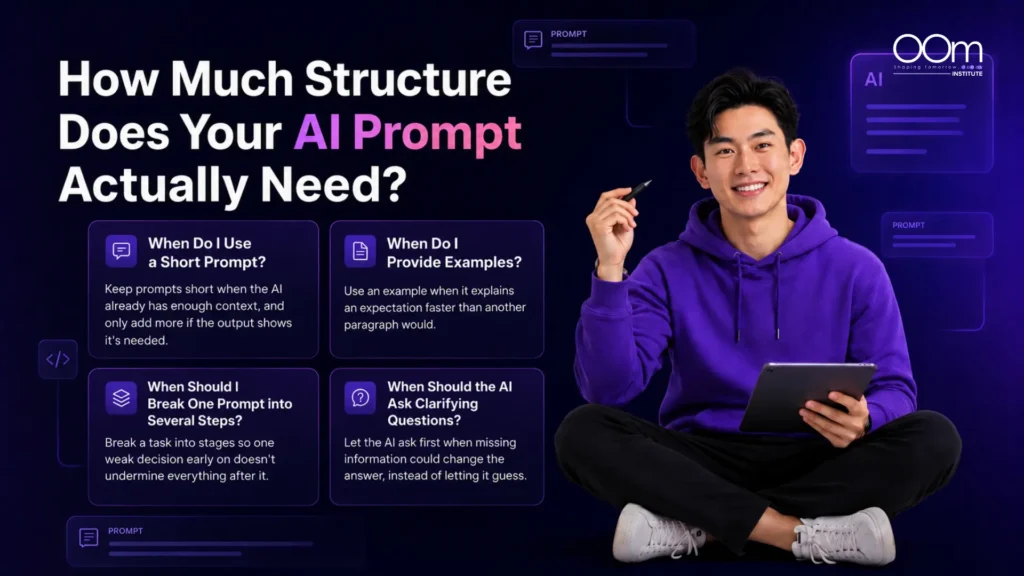
01 When Do I Use a Short Prompt?
Some of my most useful prompts are surprisingly short, especially when the AI already has enough context to work with.
For example, if I paste a paragraph and write:
Make this easier for a non-technical customer to understand while keeping the meaning unchanged.
That may already be enough. I do not need to add a persona, a detailed workflow, or several style rules unless the output shows that more guidance is needed.
This is easy to overlook when learning generative AI. A useful ChatGPT course should help you judge how much instruction a task actually needs, rather than making every prompt more elaborate by default.
02 When Do I Provide Examples?
I started using examples more often when I realised I was spending too much time trying to describe exactly what I wanted.
Tone was a good example. An instruction like “professional but conversational” could still produce something much stiffer than I had in mind. In those cases, showing the AI a short sample of the style I wanted often worked better than adding another paragraph of explanation.
I found the same with classification tasks. If I wanted AI to sort customer enquiries into different categories, a few borderline examples often made the distinctions clearer than lengthy definitions.
Now, when an instruction starts becoming difficult to explain, I ask myself whether an example would communicate the expectation more clearly and efficiently.
03 When Should I Break One Prompt into Several Steps?
I started breaking larger tasks into stages when I realised that one weak decision early on could affect everything that followed.
Competitor research is a good example. I could ask AI to identify competitors, analyse their positioning, find market gaps and recommend a strategy in one prompt. However, if the competitor list is inaccurate, the rest of the analysis is already built on the wrong foundation.
Now, I prefer to confirm the competitors first, check the information, decide what I want to compare and only then move on to recommendations.
I use the same approach for longer content tasks. Research, outlining, drafting and editing often work better as separate stages because I can review the quality of each step before moving forward.
04 When Should the AI Ask Clarifying Questions?
Another habit I had to change was expecting the AI to answer straight away.
For simple tasks, that is usually fine. However, when missing information could significantly affect the answer, I now prefer the AI to ask questions before proceeding.
For example, if I asked for a CRM recommendation without providing my budget, team size, current software or required features, I would rather get a few useful questions first than a confident list of tools based on assumptions.
In cases like that, I might add:
Before recommending an option, identify any missing information that would materially affect your recommendation and ask me for it.
That small instruction has helped me avoid a lot of irrelevant or overly generic output.
🤔 How Do I Tell Whether My Prompt Is Actually Working?
I used to judge prompts partly by how polished or sophisticated they looked.
Now, I care much more about whether the output is actually useful.
For me, a prompt works when the response is relevant, follows the important constraints, and needs little correction before I can use it.
What I Check | What I Ask Myself |
Relevance | Did the AI actually solve the problem I gave it? |
Accuracy | Are the factual claims reliable and verifiable? |
Completeness | Is anything important missing? |
Specificity | Does the answer reflect the actual situation? |
Format | Can I use the output without rebuilding it? |
Constraints | Did the AI follow the important boundaries? |
Consistency | Does the prompt still work with different inputs? |
Efficiency | Did it save me time overall? |
Efficiency matters too. If I spend 20 minutes building an elaborate prompt and another 20 minutes fixing the result, I would not consider that a particularly effective workflow.
How I Debug a Prompt That Produces Poor Results
When a prompt performs badly, I try to work out exactly what went wrong before rewriting the whole thing. The issue might be missing context, unclear instructions, too many constraints, or an output format that was not specific enough.
| Symptom | What I Usually Suspect | What I Change |
| Output is generic | Not enough useful context | Add audience, purpose or source material |
| Output is too long | Scope is unclear | Define what to cover and omit |
| Important instructions are ignored | Too many competing instructions | Remove lower-priority rules |
| Tone feels wrong | The description is too subjective | Provide an example |
| Recommendations are unrealistic | Practical constraints are missing | Add budget, timeline or available resources |
| Format keeps changing | Output requirements are vague | Define a consistent structure |
| AI invents details | Missing information is being filled in | Tell it to flag gaps instead |
| Prompt works once but fails elsewhere | It is too specific to one case | Test it with more varied inputs |
This has been much more useful than jumping from one framework to another. Once I can identify the actual problem, I can usually make a smaller, more targeted change and see whether the next output improves.
🤔 How I Turn a Successful Prompt into a Reusable Workplace Prompt for My Team
I use more structure when a prompt needs to work consistently for other people, not just for me.
A one-off prompt can be fairly informal because I already understand the context behind it. If several colleagues are going to use the same prompt regularly, the instructions, inputs and expected output need to be much clearer.
That is where an AI prompt framework becomes more useful to me. Instead of treating it as a formula for every task, I use it as a starting point for building a prompt that the team can understand, reuse and improve over time.
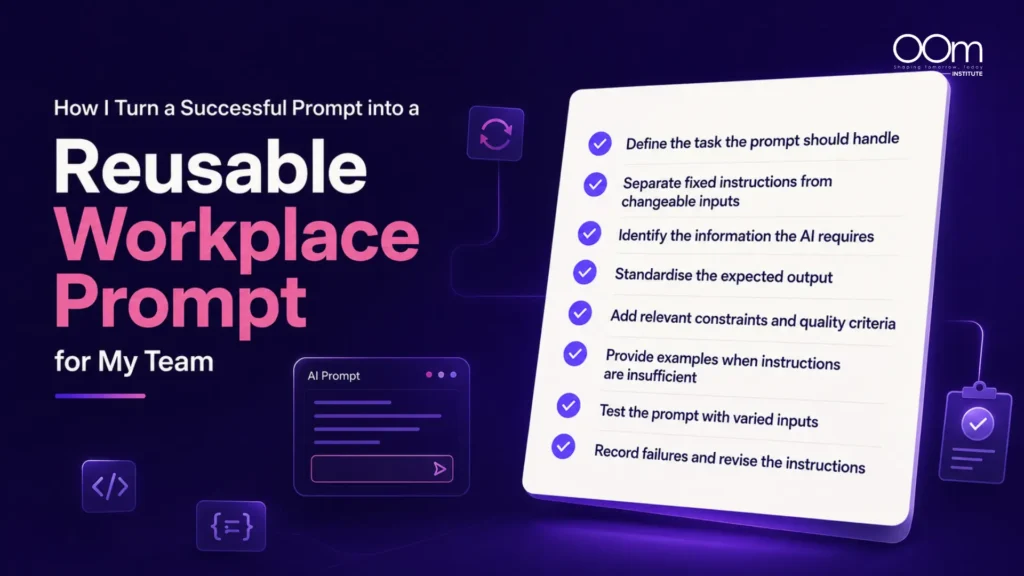
A. Define the Task the Prompt Should Handle
First, I narrow the task so it is specific enough to test.
“Help with marketing” is far too broad.
“Turn a completed campaign brief into a first-draft creative brief for the design team” gives the AI a much clearer job to do.
Once the task is defined, I can work backwards and decide what information the AI needs, what the output should include and how I will judge whether the prompt is actually working.
B. Separate Fixed Instructions From Changeable Inputs
Then, I separate the instructions that stay the same from the information that changes with each task.
For a content review prompt, the fixed instructions might cover the brand tone, review criteria and rules around unsupported claims. The changing inputs could include the article, audience, topic and target keyword.
This makes the prompt easier for others to reuse because they can immediately see which instructions should remain untouched and which fields need updating each time.
C. Identify the Information the AI Requires
I pay close attention to the corrections I keep making after the AI responds.
If I repeatedly have to clarify who the audience is, that probably needs to become a required input. If recommendations keep overlooking the budget, then the budget should be built into the template.
Some of the most useful improvements I have made to reusable prompts came from these recurring problems. They showed me exactly what information the AI was missing.
D. Standardise the Expected Output
I also find it useful to keep the output structure consistent, especially when several people will use the prompt.
For example, a customer feedback prompt might always return the recurring issue, supporting examples, possible cause and recommended action. A campaign brief could follow a fixed structure covering the objective, audience, key message, deliverables and outstanding questions.
The content will still vary from task to task, but a consistent structure makes the output much easier for the team to review and compare.
E. Add Relevant Constraints and Quality Criteria
I try not to overload reusable prompts with every possible rule. Instead, I focus on mistakes that would actually affect the output’s quality or reliability.
For research, that might mean separating verified facts from assumptions. For content, it could mean avoiding unsupported statistics. For client proposals, I might specify that the AI should not invent prices, timelines or service capabilities.
This keeps the prompt focused and practical without turning it into a long list of instructions that may not all be necessary.
F. Provide Examples When Instructions Are Insufficient
I use examples when the same instruction keeps being interpreted in different ways.
If a template asks for a “business objective” and people keep entering a deliverable such as “five Instagram posts”, I would add a simple example:
Business objective example: Generate qualified enquiries from SME owners for the new accounting service.
In cases like this, a clear example is often more useful than adding another paragraph of explanation.
G. Test the Prompt With Varied Inputs
One mistake I made with reusable prompts was testing them only on the task they were originally built for.
They could seem reliable at first, then start breaking down when someone used a slightly different input. Now, I test a few realistic variations before treating a prompt as ready for repeated use.
For example, if I build a content brief prompt around a B2B software article, I might also test it on an educational piece, a comparison article and a topic where some information is missing. This helps me spot weaknesses before rolling the prompt out more widely.
H. Record Failures and Revise the Instructions
I no longer treat reusable prompts as finished once they start working.
If several people run into the same problem, I take that as a sign that the prompt needs adjusting. The AI might keep adding an unnecessary section, users might misunderstand one of the input fields, or everyone might end up supplying the same missing information manually.
Those recurring issues usually show me what needs to change in the next version.
This is also where a prompt engineering course can be useful. Learning how to structure a prompt helps, but knowing how to test, troubleshoot, and refine it is what makes prompting practical for real workplace use.
Learn How to Build, Test and Improve Prompts with OOm Institute
OOm Institute’s Prompt Engineering course takes a practical approach to prompt development, focusing on how to build, test, and refine prompts for different types of work.
The programme goes beyond memorising frameworks by covering practical applications such as market research, content strategy and brand-aligned content. Learners also get opportunities to compare different prompting approaches, evaluate AI-generated responses and refine their instructions based on the output.
This makes the training especially relevant for workplace use, where the challenge is rarely just writing one good prompt. The more valuable skill is knowing how to adjust the context, constraints, examples and output requirements based on the task.
Rather than relying on a single AI prompt framework, the course helps learners develop the judgement needed to decide what each task actually requires.
Final Verdict: Prompt Frameworks Are Starting Points, Not Final Answers
I still use prompt frameworks, but I no longer expect one structure to suit every task. I treat an AI prompt framework as a useful starting point, then adapt it based on the context, the type of work and the quality of the output I need.
That shift has made prompting much more practical. Instead of trying to complete every part of a formula, I focus on whether the AI has the right information, enough direction and clear expectations.
If you want to build the same practical skills, OOm Institute’s Prompt Engineering course offers hands-on training in building, testing and refining prompts for real workplace tasks.
Contact OOm Institute today to find out more about the course and upcoming training dates.
Frequently Asked Questions
1. Do prompt frameworks work with all AI models?
The general principles behind prompt frameworks can usually be applied across different AI models, but the same prompt may not produce identical results. Models differ in their capabilities and how they interpret instructions, so you should still test and refine prompts for the specific tool you’re using.
2. Can I combine multiple frameworks in one prompt?
Yes. You can combine different frameworks when their components are useful for the task. For example, one may help define the context while another provides a clearer way to structure the expected output. Treat an AI prompt framework as a flexible guide rather than a set of components that must all be included.
3. What is the difference between a prompt framework and a prompt template?
A prompt framework provides a structure for deciding what information to include, such as the task, context, audience or expected output. A prompt template is a reusable set of instructions with fields you can update for repeated tasks.
4. Why does the same prompt framework produce different results?
The quality of the information inside the framework can vary significantly. Two prompts may follow the same structure but provide very different levels of context, constraints and source material. The AI model and surrounding conversation can also influence the result.
5. Are longer prompts always better than shorter prompts?
No. A longer prompt is only helpful when the additional information improves the AI’s understanding of the task. Extra instructions can become unnecessary, repetitive or conflicting if they do not add meaningful context.
6. Should I create my own prompt engineering framework?
It can be useful for recurring tasks. Instead of focusing on creating a memorable acronym, identify the information that consistently matters to the workflow, such as the audience, source material, constraints and output format, then build a simple structure around those needs.
7. Can prompt engineering frameworks prevent AI hallucinations?
No. A framework can reduce some avoidable errors by telling the AI not to invent missing information, separate assumptions from supplied facts or flag gaps in the input. Important factual claims should still be reviewed and verified where necessary.
8. Is prompt engineering still worth learning as AI models improve?
Yes. Better models may require less detailed prompting for simple tasks, but workplace tasks still depend on context the AI does not automatically know, such as organisational goals, customer needs, internal standards and practical constraints. Prompt engineering is increasingly about providing the right information and evaluating the output effectively.
9. Should I take a prompt engineering course or learn through free templates?
Free templates can help you learn common prompt structures and get started quickly. A structured course is more useful for understanding why prompts work, how to adapt them to different tasks and what to change when the output is weak.