
Key Takeaways
|
Introduction
Google has quietly released a wave of free AI tools that many people still don’t know about.
Instead of building standalone apps, Google has been cultivating an ecosystem.
Its free AI tools are designed to integrate naturally into existing workflows, whether you’re taking notes, creating content, or building simple applications.
These tools have proven to be effective, often replacing paid alternatives that cost $20–$50 per month.
They’re easy to use, accessible, and deliver clear, practical outcomes.
The best part is many of Google’s AI tools come with genuinely useful free tiers, which is why they consistently rank among the best free AI tools available today.
Below, we break down the tools we recommend and how you can use them in real-world scenarios.
Also Read: 15 Must-Have AI Tools For Businesses
I. Google Gemini 3
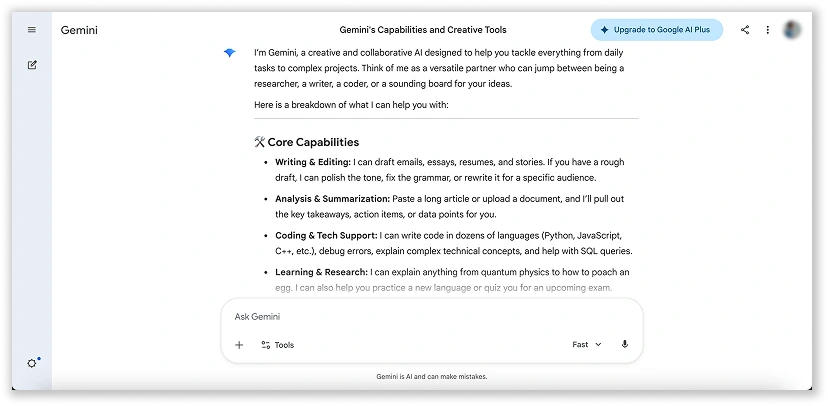
Gemini is Google’s flagship AI model and sits at the centre of its growing AI ecosystem.
It is designed to understand, operate across, and combine different types of information, including text, images, audio, video, and code.
a. What It Does
Gemini supports a mix of capabilities, from generating images and drafting content to helping structure ideas for videos or presentations.
What makes it particularly useful is how these functions are not separated into different tools, they exist within a single workflow.
🤩 Another feature that becomes more valuable over time is “Gems”.
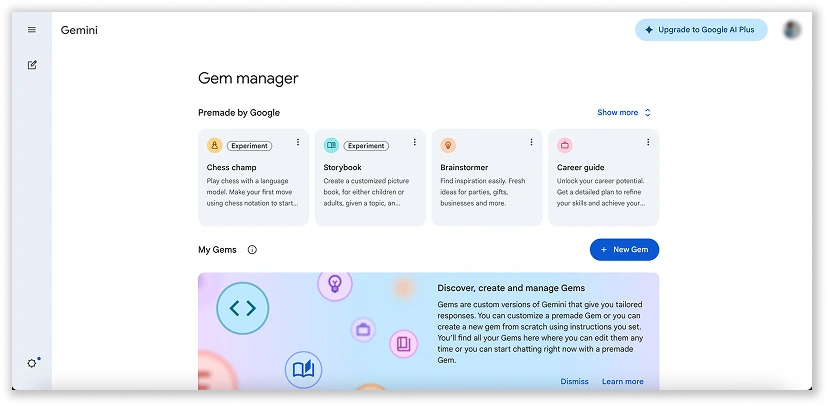
These allow you to customise Gemini for specific roles or tasks, so instead of starting from scratch each time, you’re working with something that already understands your context, tone, and objectives.
- Persona: Tell the Gem to act like a specific person or role
- Knowledge: Upload specific files (PDFs, Docs, etc.) so that the Gem will always reference it as its “source of truth”
- Persistence: Every time you open that specific Gem, it already knows its goal, your preferred tone, and the context of your project.
As of 2026, Gems are shareable. Much like a Google Doc, you can create a custom Gem for a specific task, like a “Project Onboarding Guide”, and share the link with your team so they can use that same specialised logic.
b. How It Helps
In day-to-day work, Gemini is most effective when used as it can quickly turn unstructured input into something usable.
For example, a long report can be summarised into key insights within seconds, or a rough idea can be expanded into a draft proposal or content outline.
This significantly reduces the time spent moving from “idea” to “output.”
It also supports a wide range of tasks across functions.
From drafting emails and analysing documents to brainstorming campaign ideas or troubleshooting technical issues, it adapts based on what you need at the moment.
c. Who It’s For
Gemini is flexible enough to be used across different roles, but it is especially useful for teams that deal with a mix of content, data, and decision-making.
Because of its multi-purpose nature, it’s not limited to one department. It can support marketing, operations, and even basic technical workflows.
d. What Does It Mean For SMEs
For SMEs, the biggest advantage is consolidation.
Instead of relying on multiple paid tools for writing, analysis, and ideation, much of this can now be handled within a single platform.
This reduces both cost and complexity, especially for smaller teams managing multiple responsibilities.
e. How Free It Really Is
Gemini’s free tier is sufficient for most everyday tasks, particularly for brainstorming, drafting, and light content creation.
Users typically get access to faster, lightweight models with generous usage, along with limited daily access to more advanced capabilities.
For heavier use cases such as complex coding, automation, or large-scale generation, paid options may be required.
If you’re interested in other AI content writing tools, we’ve listed them for you too!
II. Google AI Studio
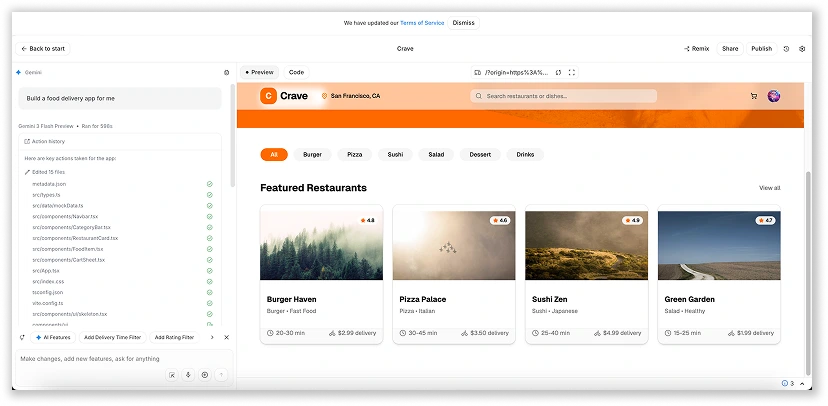
Google AI Studio is Google’s prompt engineering and prototyping environment for working with Gemini models.
It is designed for testing how AI behaves before turning prompts into real-world workflows or applications.
Unlike the consumer-facing Gemini interface, AI Studio focuses on control, structure, and experimentation rather than conversation.
a. What It Does
Google AI Studio gives you a controlled environment to test, refine, and structure prompts using Gemini models.
You can actively design how the AI should respond, including tone, format, and level of detail.
Once you’ve refined a prompt or workflow, you can generate production-ready code or API keys to integrate it into real applications.
This makes it a bridge between “trying AI” and actually using it in day-to-day operations.
It also supports different input types, allowing you to test how the models respond to text, images, and structured data depending on the use case.
💡 Tips: If you need inspiration, the prompt gallery on the right offers examples of well-structured prompts
b. How It Helps
In practice, AI Studio is where ideas become repeatable systems.
Instead of relying on one-off prompts, you can test variations and quickly see what works best.
This is particularly useful when you need consistent outputs, such as structured reports, formatted summaries, or templated responses.
It also reduces a lot of trial and error.
By refining prompts in a controlled setting, you avoid deploying something unreliable into real workflows. Over time, this leads to more predictable and scalable AI usage across teams.
c. Who It’s For
AI Studio is suited for both non-technical users and developers, depending on how deeply they want to engage with AI.
Those exploring structured prompting can use it to refine outputs, while more advanced users can prototype and integrate workflows into real applications.
d. What Does It Mean For SMEs
For SMEs, AI Studio provides a low-risk environment to experiment with AI at no cost before committing resources.
Teams can test ideas, refine workflows, and validate use cases early, reducing wasted time and improving implementation outcomes.
e. How Free It Really Is
Google AI Studio is completely free to use for prototyping and experimentation. There are no subscription fees, seat-based costs, or credit card requirements to get started.
However, this free access comes with trade-offs.
Google may use your inputs and outputs to improve its products, and usage is subject to quotas that limit how much you can use the models at no cost.
III. Notebook LM
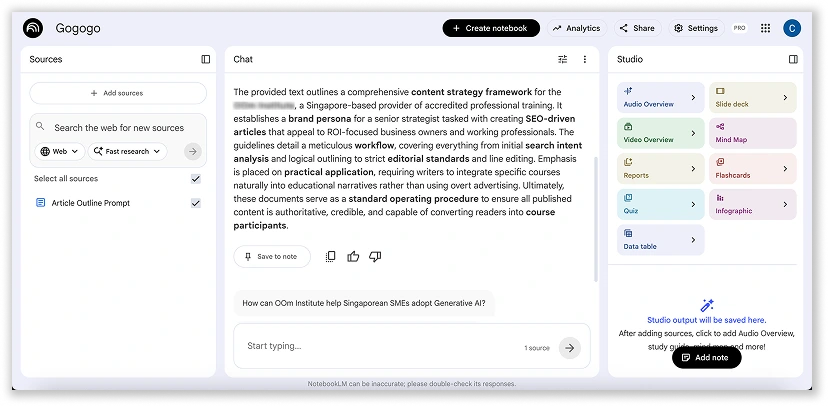
NotebookLM is Google’s AI-powered research and knowledge assistant that works with your own documents, allowing you to query them conversationally.
This makes it especially useful for research, analysis, and internal documentation.
a. What It Does
You can upload documents (PDFs, Google Docs, slides, or transcripts) and NotebookLM builds its responses directly from those sources.
Instead of passively reading through material, you can interact with it.
Ask questions, generate summaries, or turn content into reports, briefs, or study materials.
It also offers “studio-style” outputs, so it feels less like a chatbot and more like a research assistant.
You can present information as mind maps, flashcards, quizzes, infographics, or slide decks.
b. How It Helps
The biggest advantage of NotebookLM is how it handles large volumes of information.
A document that would normally take a long time to go through can be broken down into key insights within seconds.
It’s especially useful when you’re working across multiple documents.
Instead of manually comparing information, you can ask questions that span across all your sources and get a structured answer almost instantly.
c. Who It’s For
NotebookLM is especially useful for teams that work extensively with documents, research, and internal knowledge.
This includes strategy, operations, and content teams that need to process and extract insights from large amounts of information.
d. What Does It Mean For SMEs
For SMEs, NotebookLM helps turn scattered documents into a centralised and accessible knowledge base.
This makes information easier to retrieve, verify, and use, improving clarity and alignment across the team.
e. How Free It Really Is
NotebookLM is available for free through a standard Google account or basic Google Workspace plan.
That said, there are still usage limits to be aware of.
These include caps on the number of sources per notebook, daily usage limits, and restrictions on how much data can be processed at once.
For most SMEs, these limits are manageable for everyday use.
🤩 If you’re already using certain Google Workspace plans, you may have access to expanded features without additional cost.
IV. Flow
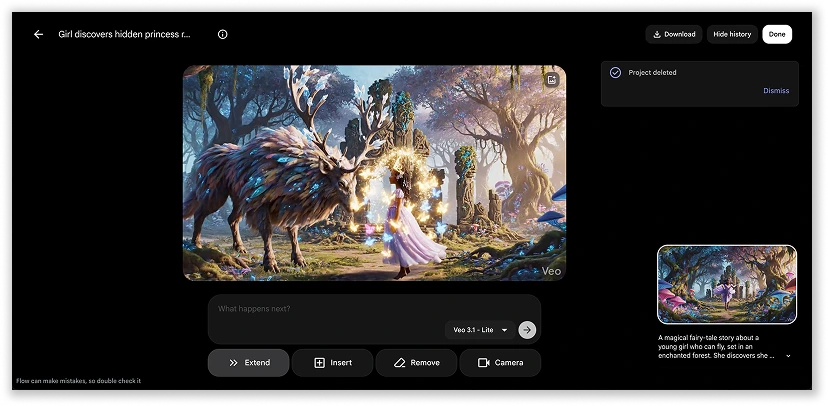
Flow by Google Labs is an AI-powered video creation platform designed to generate and edit cinematic videos, images, and scenes in minutes.
Instead of relying on complex editing software, Flow focuses on prompt-driven creation, where scenes, styles, and narratives are generated through instructions rather than manual production.
a. What It Does
Instead of editing timelines, adjusting layers, or working through complex software, everything starts with a prompt.
You describe a scene, a style, or even just an idea, and Flow generates a cinematic output based on that input.
What stands out is how much control you still retain despite the simplicity.
You can guide how a scene begins using an image, adjust camera angles, extend sequences, or refine specific parts of a video by selecting and editing them directly.
It’s not just generating clips, it’s helping you shape a narrative visually.
It also brings together elements that are usually separate, such as visuals, audio, and transitions, allowing you to assemble a complete sequence without needing multiple tools.
b. How It Helps
Instead of spending hours planning, filming, or editing, you can quickly turn an idea into a visual draft.
This makes it much easier to test concepts before committing to full production.
Campaign ideas, ad concepts, or social media content can be explored rapidly, with multiple variations generated in a short time.
It lowers the cost of experimentation, which is often where most ideas would normally get filtered out.
It also helps bridge the gap between idea and execution.
Rather than imagining how something might look, you can see a working version almost immediately, which makes collaboration and decision-making much more efficient.
c. Who It’s For
Flow is best suited for marketing teams, content creators, and businesses that rely on visual storytelling.
It is particularly helpful for those who need to produce video content but lack the time, budget, or technical resources for traditional production.
d. What Does It Mean For SMEs
For SMEs, Flow significantly lowers the barrier to video production.
Teams can quickly generate and test ideas, making it easier to stay active across digital channels without heavy production costs.
e. How Free It Really Is
Flow is free to start, but it operates on a credit-based trial for experimenting with video and image generation rather than unlimited usage.
Free users receive a one-time 100-credit bonus and 50 daily credits (non-rollover), which can be used for generating videos and images.
Because of this, the free version is best suited for experimentation and prototyping rather than large-scale production.
It allows users to explore the tool’s capabilities, test ideas, and understand its potential before deciding whether to scale further.
V. Opal
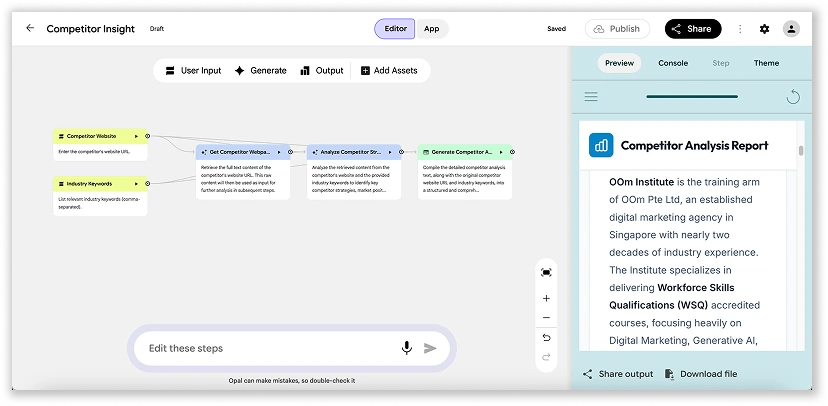
Opal is an experimental no-code platform from Google Labs that allows users to create, customise, and share AI-powered “mini-apps” using natural language.
You describe your desired tool, and Opal generates a visual, node-based workflow that chains Gemini AI models and tools.
a. What It Does
Instead of using AI through one-off prompts, Opal lets you turn those instructions into reusable mini-apps.
You describe what you want, and it generates a visual workflow that maps out each step, from input to processing to output.
This shifts the experience from simple interactions to building structured systems. Once created, these workflows can run repeatedly without needing to re-enter the same instructions.
The interface reflects this approach, presenting each workflow as a series of connected nodes that you can refine, adjust, or expand.
Over time, a simple idea can evolve into a more robust internal tool.
b. How It Helps
Opal is most useful when you find yourself repeating the same type of work like generating reports, handling common enquiries, or creating structured content.
These tasks can be turned into repeatable workflows that deliver consistent results with minimal manual input.
It also lowers the barrier to building internal tools.
What would typically require development can be created through simple instructions and visual editing, making it easier to test and refine ideas quickly.
Another advantage is reduced reliance on individual prompting skills.
With the logic built into the workflow, outputs become more consistent across the team.
c. Who It’s For
Opal is ideal for teams managing structured, repeatable tasks such as customer support, operations, and content workflows.
It is especially useful for businesses looking to explore AI workflow automation without building full-scale systems.
d. What Does It Mean For SMEs
For SMEs, Opal enables the creation of simple internal tools without technical expertise.
This improves efficiency and consistency, allowing teams to scale operations without increasing workload.
e. How Free It Really Is
At the moment, Opal is completely free to use as part of Google Labs’ experimental releases.
There are no subscription fees or clear usage limits, which makes it accessible for teams that want to explore and build without upfront cost.
However, as with most experimental tools, this may change over time.
Google is likely using this phase to gather feedback and refine the product, so pricing structures could be introduced in the future.
VI. Google Antigravity
Google Antigravity is a next-generation, agent-first IDE designed for autonomous software development.
Antigravity runs locally and is built around the idea that AI agents should be able to take on full development tasks, not just assist with code snippets.
a. What It Does
Antigravity introduces a multi-agent development environment where AI agents can be created, assigned, and monitored in parallel.
Each agent can handle different parts of a project, from backend logic to frontend development, while coordinating through a central “mission control” interface.
A key feature is its browser-in-the-loop capability. Agents can actively interact with live websites so they are not just writing code, but also testing it in real time.
It also supports persistent context, allowing agents to retain knowledge across sessions.
This means workflows, patterns, and prior decisions can be reused and refined over time rather than starting from scratch each session.
On top of that, Antigravity generates structured artifacts such as implementation plans, documentation, and walkthroughs, helping developers understand and verify what the AI has produced.
b. How It Helps
Antigravity is particularly useful for full-stack development, where both frontend and backend work can be handled in parallel by different agents.
It significantly speeds up prototyping by allowing developers to describe what they want and let agents generate working applications with minimal manual coding.
For repetitive or operational workflows, it enables a form of “skill automation”, where processes like report generation, system setup, or deployment steps can be turned into reusable agent-driven tasks.
It also acts as a technical support layer for smaller teams, helping debug code, review security issues, and explain complex systems in simpler terms.
For marketing or product teams, it can extend into operational automation, supporting tasks such as campaign creation, experimentation, and content pipeline optimisation.
c. Who It’s For
Antigravity is designed primarily for developers and technical teams who want to accelerate software development through agent-based workflows.
It is especially relevant for teams building complex products who need to reduce time spent on manual coding and coordination across multiple parts of a system.
d. What Does It Mean For SMEs
For SMEs, Antigravity represents a shift towards an AI workflow automation, where smaller teams can operate with capabilities that previously required larger engineering departments.
By automating development and technical processes, it allows smaller teams to build and maintain solutions more efficiently.
e. How Free It Really Is
Google Antigravity is currently in public preview, which means it is free to use for early adopters.
At this stage, users get access to core agent functionality and development features without subscription fees, although usage may be subject to rate limits or performance constraints.
As with most experimental Google Labs products, stability is still evolving, and features may change as the platform develops.
It is also important to note that input data may be used to improve future models, as part of the preview programme.
VII. Pomelli
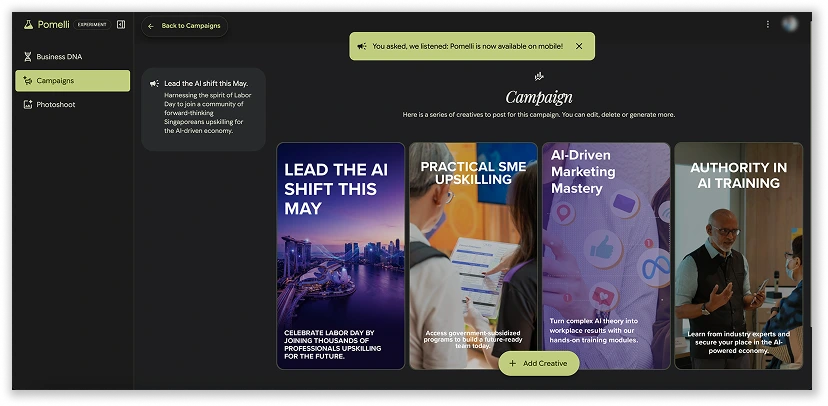
Pomelli, an AI-powered marketing tool from Google Labs and Google DeepMind, designed to help businesses quickly generate on-brand social media campaigns and marketing assets.
It operates as a web-based, public beta experiment that scans a business’s website to create a personalised marketing strategy.
a. What It Does
Instead of manually designing posts or planning campaigns, it begins by analysing your website.
From there, it builds a kind of “brand snapshot”, identifying your visual style, tone of voice, colours, and overall identity.
Once that foundation is established, Pomelli uses it to generate marketing ideas and content assets.
This can include social media posts, ad creatives, banners, and other promotional materials that are already aligned with your brand direction.
What makes it slightly different from typical design tools is that it doesn’t just generate visuals, it tries to stay consistent with your existing brand identity automatically.
b. How It Helps
Pomelli is most useful when marketing needs to move quickly but still stay consistent.
Instead of starting each campaign with a blank page, it can suggest ready-made ideas based on your business type and existing website content.
This helps reduce the time spent on brainstorming and early-stage planning.
Since it pulls directly from your website, the outputs are more aligned with your actual tone and visual identity, instead of relying on manual adjustments.
Another practical benefit is speed.
Tasks that would normally require a designer or marketing agency can be drafted in a much shorter time, allowing teams to focus more on refining ideas rather than creating everything from scratch.
c. Who It’s For
Pomelli is designed for businesses who need regular graphic design with AI but don’t always have dedicated design or creative teams.
It is especially useful for small businesses managing their own social media, testing multiple campaign directions, or producing frequent promotional materials.
d. What Does It Mean For SMEs
For SMEs, Pomelli simplifies content creation while maintaining brand consistency.
This helps teams produce marketing materials more efficiently without relying heavily on external support.
e. How Free It Really Is
Pomelli is currently free as part of its beta phase under Google Labs.
During this period, users can experiment with generating campaigns and brand assets without subscription fees.
However, there are some limitations, such as restrictions on how many brand profiles you can create and manage at one time.
Since it is still in early development, Google has not confirmed long-term pricing.
It is likely that paid tiers or usage-based models will be introduced once the product matures beyond its beta stage.
VIII. Google Colab
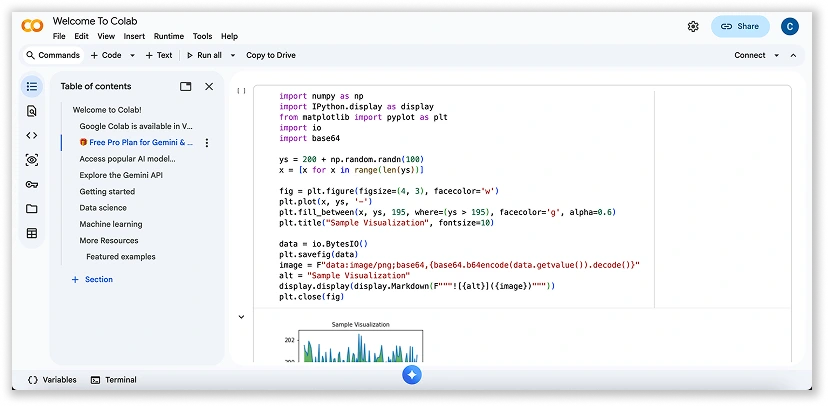
Google Colab (Colaboratory) is a cloud-based coding environment that lets you write and execute Python code directly in your browser.
It is built on top of Jupyter Notebook and runs entirely in the cloud, meaning there is no setup required.
a. What It Does
Colab removes the usual setup friction so you can start coding immediately.
You write Python in notebooks and run it cell by cell, with outputs shown instantly underneath.
Because it is built on Jupyter Notebook, you’re not limited to code alone.
You can mix code with explanations, images, Markdown, HTML, and even LaTeX, which makes it useful both for building and documenting your work.
It also gives you access to free GPUs and TPUs when needed, and lets you collaborate with others in real time, similar to Google Docs.
b. How It Helps
Colab makes Python work feel much lighter and faster. You don’t need to install anything or manage environments, which removes a lot of beginner and setup friction.
Most common data science libraries are already available, so you can focus on building instead of configuring.
It also helps you work with more powerful computing resources without owning expensive hardware, which is especially useful for AI and machine learning tasks.
On top of that, collaboration is seamless. Teams can work in the same notebook, comment on sections, and iterate together in real time.
With Gemini integrated, you can also generate code, debug issues, or understand scripts more easily.
c. Who It’s For
Colab is suited for data analysts, developers, students, and businesses exploring data science or machine learning.
It is particularly helpful for users who need computing power without setting up complex environments.
d. What Does It Mean For SMEs
For SMEs, Colab provides access to advanced computing resources at minimal cost.
This enables businesses to experiment with data-driven strategies without investing in expensive infrastructure.
e. How Free It Really Is
Colab is free to use, and you don’t even need a credit card to get started.
But it’s important to understand that it runs on shared, best-effort resources. That means things like GPU and TPU access are not guaranteed, and performance can vary depending on demand.
For light experimentation and learning, the free version is more than enough.
IX. Stitch
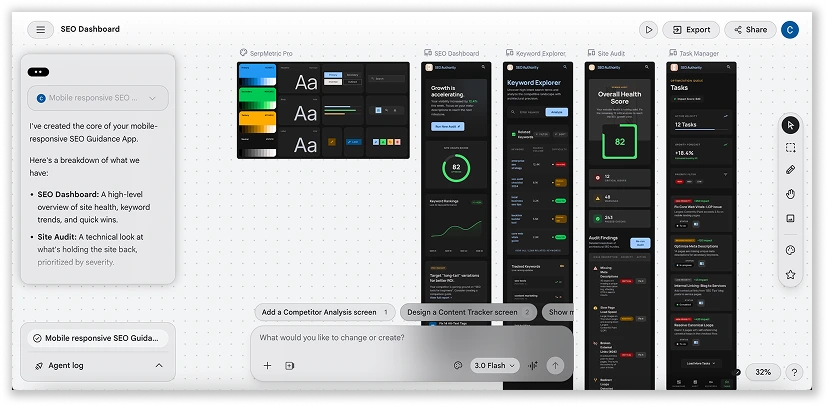
Google Stitch is an AI-powered UI design tool that turns ideas into high-fidelity, editable interfaces for web and mobile apps from text prompts, images, or sketches.
It’s part of what’s often called “vibe design”, where the focus shifts from precise layout work to expressing intent and iterating quickly.
a. What It Does
Stitch helps you go from idea to interface almost instantly.
You can describe a screen in text, upload an image or sketch, or even make changes using voice commands.
It then generates structured, editable UI layouts based on your input.
It also goes beyond single screens. Stitch can connect multiple screens together to form clickable prototypes, allowing you to test basic user flows as if the app already exists.
On the development side, it can export usable frontend code such as HTML, CSS, or React, so designs are not just visual, they’re ready to be implemented.
It also integrates with tools like Figma, making it easier to refine and hand off designs for professional polishing.
b. How It Helps
Instead of spending hours setting up layouts, you can immediately generate multiple design directions based on a simple prompt or idea with Stitch.
This makes early-stage exploration much faster and more flexible.
It also helps you think in flows rather than static screens.
As you interact with generated UI, Stitch can suggest or build the next logical screen, helping you quickly stitch together a full user journey.
For developers, it shortens the gap between design and implementation by producing clean frontend code that can be used as a working starting point rather than rebuilt manually.
It can even generate full design systems from a single website or prompt, including colors, typography, and reusable components.
c. Who It’s For
Stitch is designed for anyone including founders, designers, and team looking to turn an idea into a working interface quickly.
It’s especially useful for those who want to move fast without getting stuck in detailed UI work too early or test user flows quickly before committing to full development.
d. What Does It Mean For SMEs
For SMEs, Stitch lowers the barrier to building digital products.
It allows small teams to prototype and validate ideas without needing large design or development resources, effectively compressing the early stages of product development.
This means SMEs can test more ideas, iterate faster, and bring concepts to market with less upfront cost and technical overhead.
In practice, it shifts design from a specialised, time-heavy process into something that can be done quickly and repeatedly as part of everyday decision-making.
e. How Free It Really Is
Google Stitch is currently free while it remains in experimental preview under Google Labs.
There are no subscription tiers or credit card requirements, but usage is subject to monthly generation limits.
These limits vary depending on the mode you use, with faster “standard” generations allowing more volume, and higher-quality experimental modes offering fewer but more advanced outputs.
As with most experimental Google tools, these limits and pricing structures may evolve over time as the product matures.
AI Models Powering These Tools
Behind every feature and interface lies a layer that most users never see: the AI models themselves.
These are the engines that make Google’s tools responsive, adaptable, and capable of handling a variety of tasks.
Across Google’s ecosystem of free AI tools, these models work in concert to support everything from content generation to image creation and video synthesis.
While the tools shape the user experience, it is these underlying models that drive the quality, speed, and flexibility of the outputs.
I. Gemini Gems
Gemini Gems are customised versions of Gemini, tailored for specific tasks or workflows. Instead of starting from scratch each time, users can rely on pre-configured setups designed for particular use cases, making interactions more focused and efficient.
II. Nano Banana
Nano Banana is a lightweight model built for speed and on-device use. It is designed to handle tasks quickly without relying heavily on cloud processing, which makes it suitable for real-time interactions and mobile environments.
III. Imagen
Imagen is Google’s image generation model, used to create visuals from text prompts. It is widely applied in design, marketing, and content creation, where quick turnaround and visual consistency are important.
IV. Veo 3
Veo 3 focuses on AI video creation, producing dynamic and realistic outputs from simple inputs. It enables users to experiment with motion, scenes, and storytelling without the need for traditional video production tools.
V. Lumiere
Lumiere is designed for advanced video synthesis, with a focus on smoother motion and more coherent visual sequences. It improves how scenes flow, making generated videos feel more natural and less fragmented.
Together, these models form the foundation behind many of the best free AI tools within Google’s ecosystem, powering the capabilities that users interact with on the surface.
Conclusion
Google isn’t just building AI features.
These 9 free Google tools are best understood as the training wheels of enterprise AI adoption.
They allow individuals and teams to experiment, prototype, and automate real work long before committing to full-scale systems or infrastructure.
And here’s the key shift: you don’t need engineers to start.
Because while you don’t need engineers to begin, you do need the right capabilities to scale what works securely, consistently, and across the organisation.
That’s where structured learning becomes important.
At OOm Institute, we provide AI training to help businesses and teams build the practical skills needed to adopt and apply AI effectively in real workflows.
Frequently Asked Questions
1. What is the difference between Google AI tools and AI engines?
AI engines are the underlying models, such as Gemini or Imagen, that power capabilities like text generation, image creation, or analysis. AI tools are the interfaces built on top of these models, designed for everyday use. In simple terms, the engine does the thinking, while the tool is what you interact with.
2. Are all these Google AI tools completely free to use?
Most come with free tiers that are usable for day-to-day tasks, although there are limits on usage. More advanced features or higher volumes typically require a paid plan. For many SMEs, the free versions are enough to get started and test real use cases.
3. Is my business data safe when using free Google AI tools?
Google applies enterprise-level security standards across its platforms. That said, it is still important for businesses to review data policies carefully and avoid uploading highly sensitive or confidential information unless it is necessary and compliant with internal guidelines.
4. Do I need coding skills to use Google AI Studio?
Not necessarily. While developers will get more out of its advanced features, non-technical users can still explore it through templates and guided interfaces. Basic prompt usage does not require coding knowledge.
5. Can I use the images and videos generated by Flow for commercial ads?
In many cases, yes, but usage rights can vary depending on the tool and the content generated. It is always worth checking Google’s latest terms to confirm what is permitted, especially for commercial campaigns.
6. Which tool is best for beginners vs. advanced users?
Beginners often find tools like Gemini and Notebook LM easier to pick up, as they are more intuitive and require less setup. More advanced users tend to benefit from Google AI Studio and Colab, where there is greater flexibility and control.
7. How do Google AI tools compare to other AI platforms like OpenAI or Microsoft Copilot?
Google’s strength lies in how its tools connect within a broader ecosystem and support multi-modal use cases. Other platforms may perform better in specific areas, but Google’s approach focuses on integration, allowing different tools to work together more seamlessly.